Run the restaurant and fill the seats. One login.
Ospelia is an operations platform, a marketing platform, or both in one login. It reads your POS every few minutes, so sales, labor and the P&L show today's numbers.
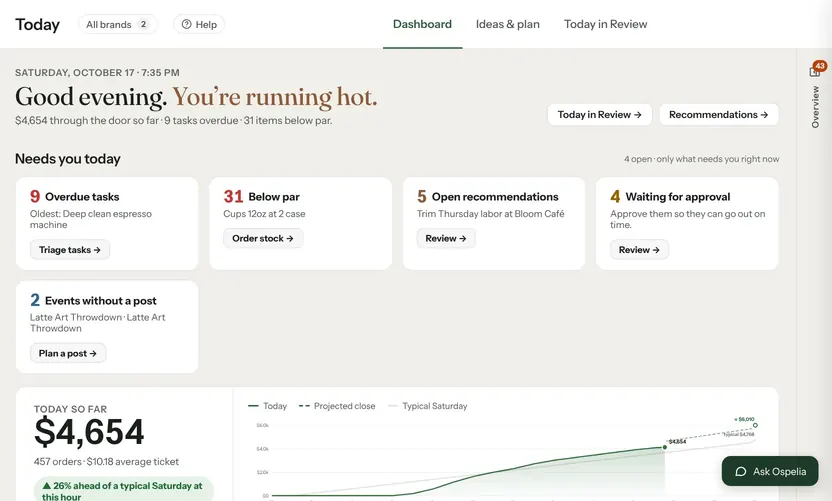
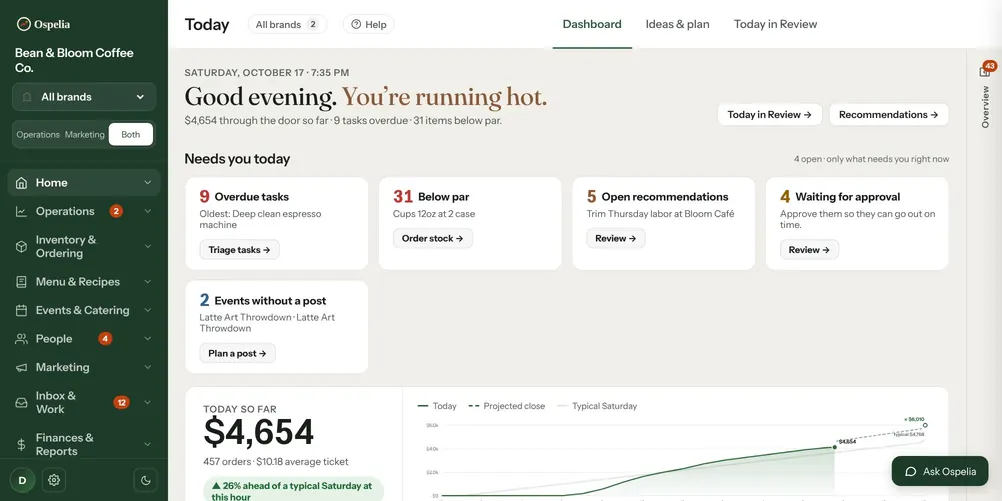
What needs you right now
Sales so far against a typical day, where the day will close, and what needs a decision today.
- So far today
- $4,654
- Overdue tasks
- 9
- Items below par
- 31
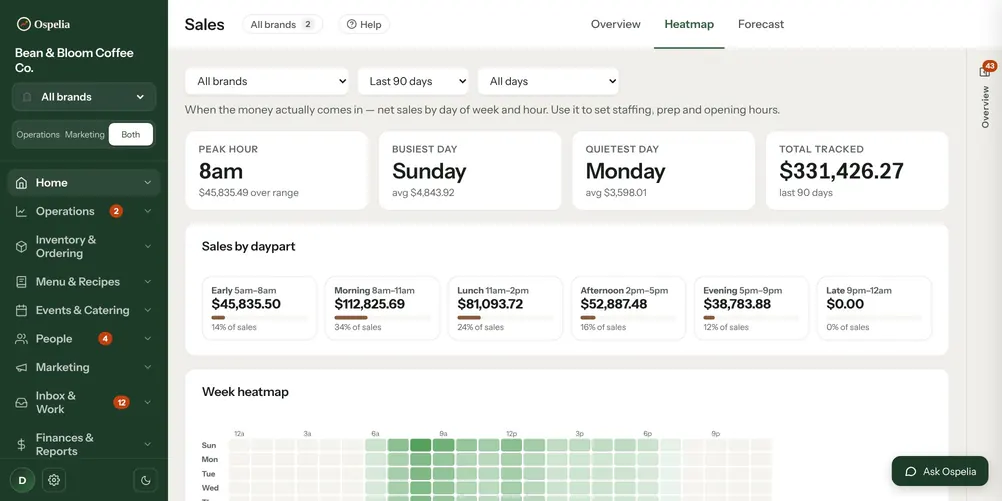
When the money actually lands
Sales by hour and weekday, split into dayparts — the picture you staff, prep and set hours around.
- Peak hour
- 8 AM
- Busiest day
- Sunday
- Tracked, 90 days
- $331,426
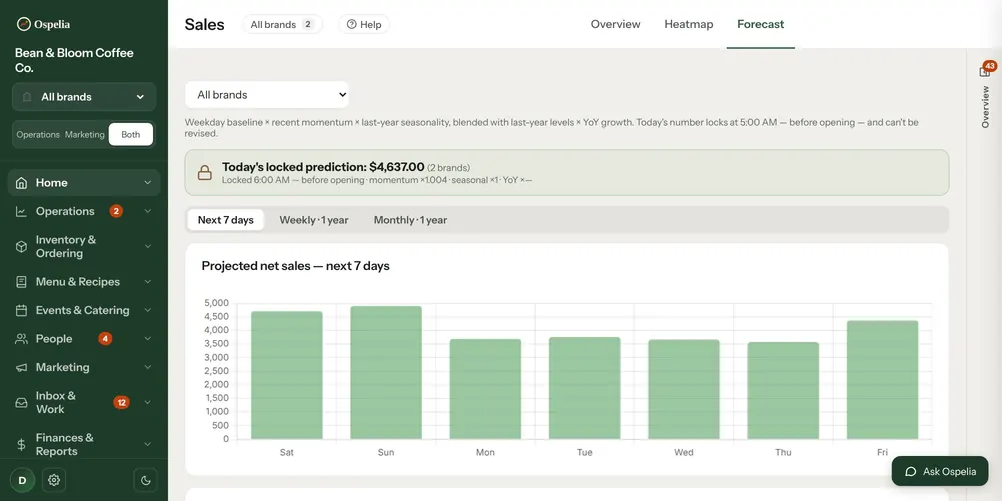
Next week, before it happens
A forecast from your own history and recent momentum. Each morning's number locks, so accuracy is on the record.
- Next 7 days
- $28,635
- Accuracy, 30 days
- 95.6%
- Bias
- −2.0%
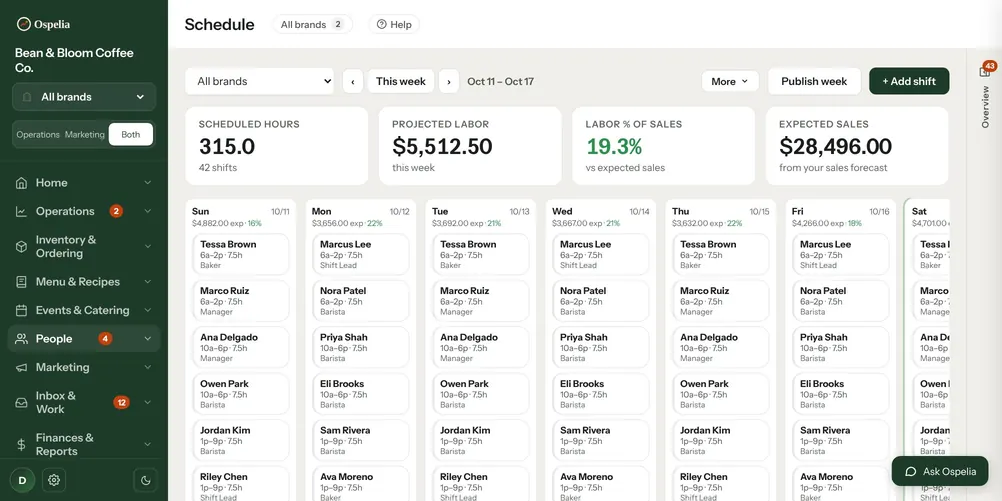
A schedule built on expected sales
Labor cost and labor percent move with every shift you add, measured against the week's forecast.
- Scheduled
- 315 hrs
- Projected labor
- $5,512
- Of expected sales
- 19.3%
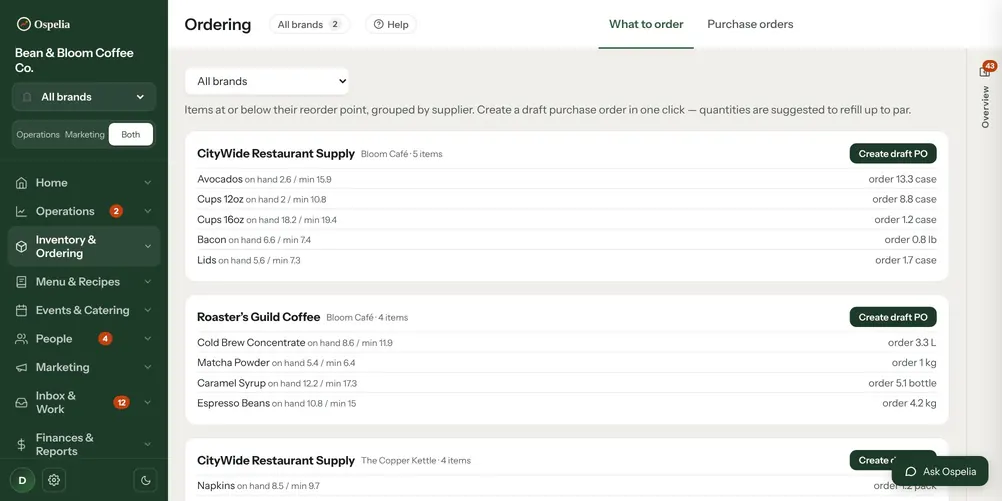
The order, already written
Everything at or below par, grouped by supplier, with quantities to bring you back up. One click to a purchase order.
- Low or out
- 31
- Suppliers
- 4
- Stock value
- $6,374
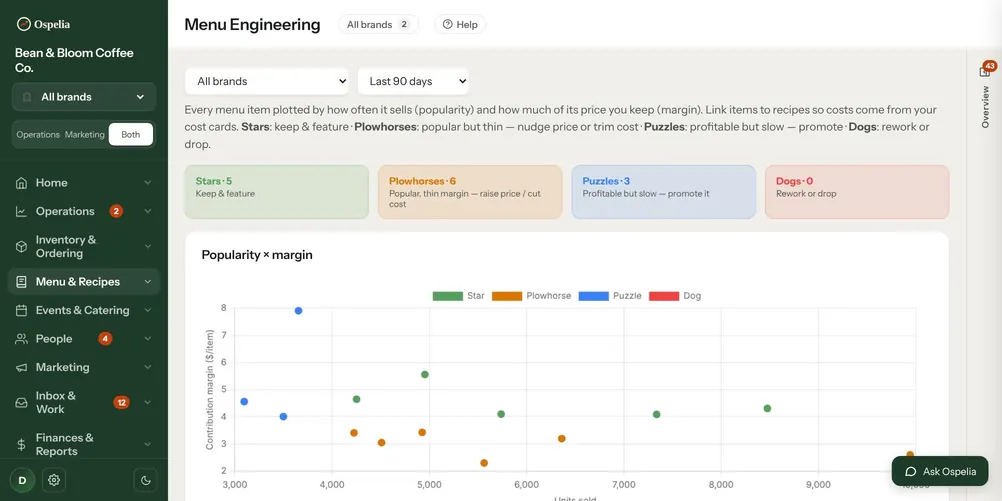
What deserves the menu space
Every item by popularity and margin, with plate cost from your real ingredient prices. Simulate a price before you change it.
- Stars
- 5
- Plowhorses
- 6
- Puzzles
- 3
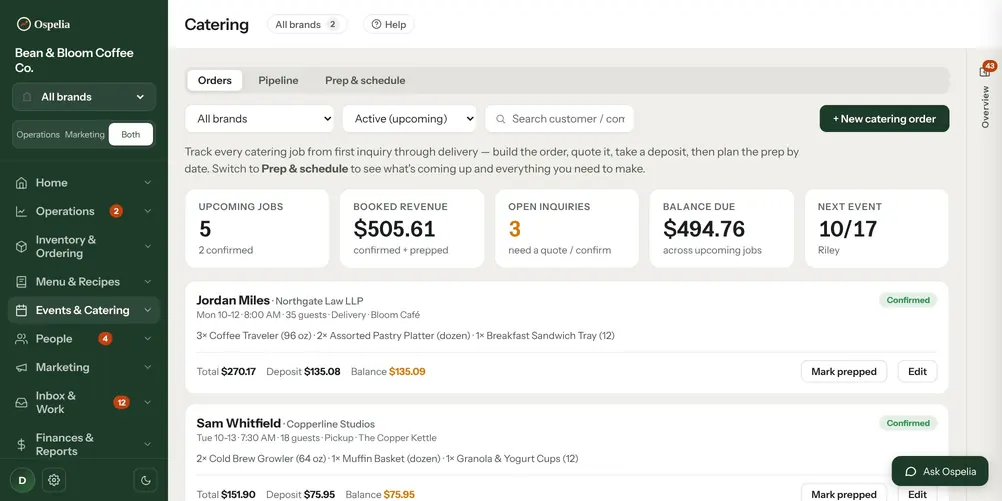
Catering from inquiry to prep list
Quote it, take the deposit, track the balance, then see what has to be made on which morning.
- Upcoming jobs
- 5
- Booked
- $506
- Balance due
- $495
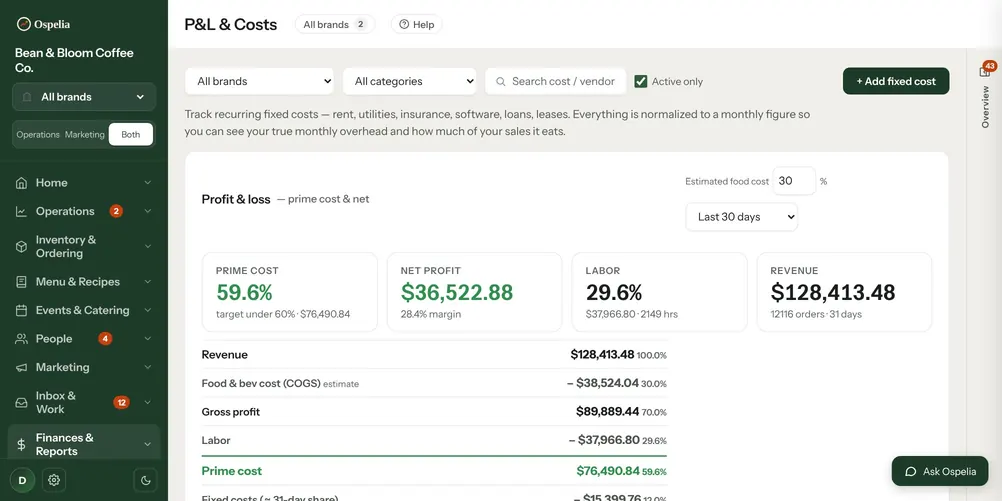
Prime cost, current today
Sales from the POS, labor from timecards, food cost from recipes and every fixed bill — added up into a P&L you can read any day.
- Prime cost
- 59.6%
- Net margin
- 28.4%
- Net profit, 30 days
- $36,523
Example café · demo data from the live product
Choose your platform.
Operations runs the building. Marketing fills it. Take the one you need, or both together in one login — unlimited users.
Connect it once. Then it keeps up.
Connect
Square syncs sales, items, labor and customers every few minutes. Marketing, reviews and Drive plug in beside it. No POS? A daily record by hand works too.
Your POS feeds sales, the forecast, labor and the P&L.
Understand
Today against a typical day, next week's forecast, plate cost from real prices and a prime cost you can check any day of the month.
Supplier prices feed plate cost, which feeds menu engineering.
Act
Write the schedule against the forecast, send the order that's already drafted, adjust the price the menu matrix flagged — in the same place you saw the problem.
Counts feed the order; the forecast feeds the schedule and prep lists.
An assistant on every page.
Ask Ospelia reads your sales, labor, menu, website and Google numbers, then answers, drafts and plans. Every Monday it writes the week's growth report, finds SEO fixes and drafts next week's posts. It never posts, sends or spends on its own.
Last week, read for you. Next week, drafted.
Sales next to website visits, Google searches, reviews and social, with what worked and three actions written and ready to save.
- Sales last week
- $25,940
- Website visits
- +12%
- Actions drafted
- 3

- SEO fixesMore clicks from Google→
- Google profile coachClimb Google Maps→
- Marketing autopilotNext week, drafted for you→
- Win back guestsWho stopped coming, and what to send→
- Write it for mePosts, emails, replies, staff notes→
- Snap an invoiceA photo becomes an invoice→
Example café · demo data from the live product
The forecast does the schedule's math.
Next week's expected sales sit on every day of the schedule, so labor percent moves with each shift you add while you're still writing the week.


Example café · demo data from the live product
The same workspace, in your pocket.
Managers and staff work from their phones — the morning numbers, checklists, the kitchen board, replies to guests. Same account, same data, with a bottom bar for the screens used most.
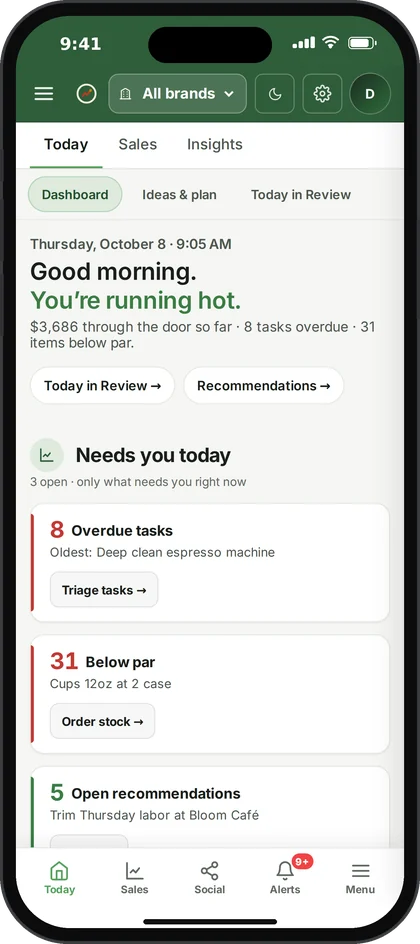
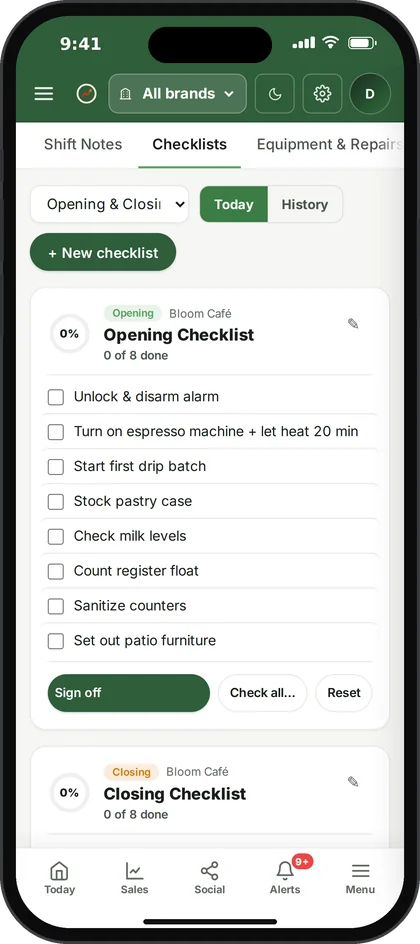
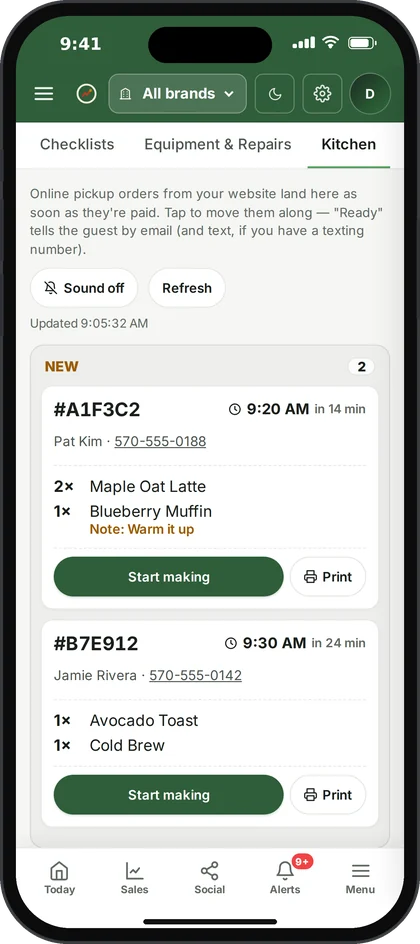
Ospelia on an iPhone · demo data from the live product
Starts with your POS. Connects to the rest.
9 connections are live today, and 27 more are planned — each one listed honestly, with its status.
 SquarePoint of sale
 Manual entryPoint of sale
 Meta AdsMarketing & ads
 Google AnalyticsMarketing & ads
 Google Search ConsoleMarketing & ads
 Facebook EventsMarketing & ads
 GoHighLevelEmail & CRM
 Google Business ProfileReviews & reservations
 Google DriveFiles & storage
One login for what usually takes four subscriptions.
Most restaurants stitch together a cost tool, a scheduling app, an inventory system and a spreadsheet. Here's what each one covers, from their own published pages.
| What you get | Ospelia | MarginEdge | 7shifts | MarketMan | Restaurant365 |
|---|---|---|---|---|---|
| Sales reporting & dayparts | Operations | Included | — | — | Included |
| Sales forecast | Operations | — | Included | — | Included |
| Scheduling | Operations | — | Included | — | Included |
| Inventory & par levels | Operations | Included | — | Included | Included |
| Recipe costing | Operations | Included | — | Included | Included |
| Catering & events | Operations + Marketing | — | — | — | — |
| Marketing, reviews & guests | Marketing | — | — | — | — |
| Daily P&L / prime cost | Operations | Included | — | — | Included |
- vs Restaurant365Covers 10 of the 13 things Ospelia includes→
- vs MarginEdgeCovers 7 of the 13 things Ospelia includes→
- vs MarketManCovers 3 of the 13 things Ospelia includes→
- vs 7shiftsCovers 5 of the 13 things Ospelia includes→
- vs xtraCHEF by ToastCovers 2 of the 13 things Ospelia includes→
- vs SpotHopperCovers 2 of the 13 things Ospelia includes→
— means not listed on that company's published product or pricing pages, checked 20 Oct 2026.
Built inside a working restaurant group.
Used before it ships
Ospelia runs the restaurants of the group that builds it. Every feature has to earn its place on a real Friday before anyone else sees it.
Reads your POS, never changes it
Ospelia reads your POS so it can report and plan, and never edits it or your menu. Anything it posts, sends or charges happens only when you set it up or click.
Walled off by location
Each account's data is isolated in the database, and every person only sees the sections and locations their role allows.
A dedicated account rep
One named person at Ospelia helps you connect your POS, bring your data across and train the team, then stays your contact after you're live.
Before you start.
Anything else, ask your account rep or email hello@ospelia.com.
Which POS systems does Ospelia work with?
Square syncs automatically today — sales, items, labor and customers. Toast, Clover, Lightspeed and SpotOn are planned, and Toast restaurants can join the early-access list on the integrations page. If you don't use a POS, you can enter a daily record by hand and every other feature works the same.
Who helps us get set up?
A dedicated account rep. Every account gets one named person at Ospelia who helps connect your POS, bring your recipes, stock and team across, and answers your questions after you're live.
Is there a free trial?
Yes, 7 days. You add a card when you start the trial, and nothing is charged until the 7 days are up. Cancel before then and you pay nothing.
Is Ospelia an operations platform or a marketing platform?
Either, or both. Operations runs the building — sales and forecasts, schedules and labor, stock, recipes, catering and the P&L. Marketing fills it — social, email and automations, events, ads, reviews and your guest list. Take one, or both in one login.
What does it cost?
Ospelia is priced per location, depending on the platform you take, with unlimited users on every plan. Book a demo and we'll go through it and give you a number for your group.
How long does setup take?
About fifteen minutes to connect your POS and add your locations. Recipes, inventory and the team can come in over the first week, and we're on hand to help you bring data across.
Does it replace my accountant or payroll?
No. Ospelia gives you a daily P&L to run the business on, but it doesn't do general-ledger accounting, invoice processing or payroll. Your bookkeeper still closes the books.
Can my team use it on their phones?
Yes. The whole workspace works in a phone's browser — counts, checklists, shift notes, schedules — and staff can switch it to Spanish.
What can Ospelia change in my other systems?
It reads your POS and never changes it — not your sales, your items or your menu. Anything it posts, sends or charges — social posts, guest emails and texts, ads you boost, payments for website orders on your own Stripe — happens only when you set it up or click.
Run the whole restaurant from one place.
Unlimited users on every plan. Set up in about fifteen minutes.
7-day free trial · card required, nothing charged for 7 days · cancel any time